PLATFORM

AI Workspace

Bring conversations, approved knowledge, task guidance and action controls into one role-aware workspace for service teams.

Discuss AI Workspace
CAPABILITIES

Designed around real work.

Role-specific work views
Unified customer and interaction context
Decision trees and checklists
Assisted drafting, review and follow-up
AI Workspace specialists working together in a bright corporate environment
role workspace for AI Workspace
AI Workspace technology supporting a connected enterprise workflow
focus flow in operation
VISUAL 01

Operating context

Signals, knowledge and decisions move through a controlled journey built around AI Workspace. Each point represents a person, trusted information, a business rule or a connected system contributing current context.

VISUAL 02

Connected intelligence

AI assistance and human judgement stay connected as each interaction progresses. Intelligence supports understanding and action while explicit controls preserve confirmation, authority and escalation.

HOW IT WORKS

A practical path from conversation to action.

The platform layer brings channels, knowledge, workflow logic and human support into one operating model. That matters because a useful AI experience must do more than answer a question: it must understand the stage of the journey, work with approved information and know when a person should take over.

For AI Workspace, the first step is to define the journey in operational terms. AIIT identifies the questions people ask, the information required, the systems involved and the moments where confidence or authority changes. This creates a bounded design that teams can review before automation is introduced.

The experience can then combine Role-specific work views, Unified customer and interaction context, Decision trees and checklists. Approved knowledge provides grounding, workflow rules preserve required steps, and integration points connect the conversation to current business context. If the request becomes uncertain, sensitive or exceptional, the interaction can pass to a person with the relevant history attached.

Implementation should progress in observable stages. A focused first journey gives stakeholders space to test language, decision boundaries, handovers and operational ownership. Feedback from real use can inform measured refinement without turning the system into an uncontrolled collection of disconnected responses.

The potential value is practical: Reduce switching between systems; Make complex work easier to follow; Preserve accountability in assisted tasks. The exact result depends on the organisation, its source information and the process being improved, so AIIT keeps discovery centred on the work itself rather than making assumptions about outcomes.

Operating ownership continues after launch. Source information needs responsible owners, journey changes need review and service teams need a clear way to report unexpected behaviour. These routines help the capability stay connected to current business practice rather than becoming a static layer around a changing process.

AIIT brings operational and technical perspectives into the same conversation. This helps teams evaluate not only whether a journey can be automated, but whether it can be supported, governed and improved with confidence over time.
AI WORKSPACE IN DEPTH

One focused place where people and AI get complex work done together.

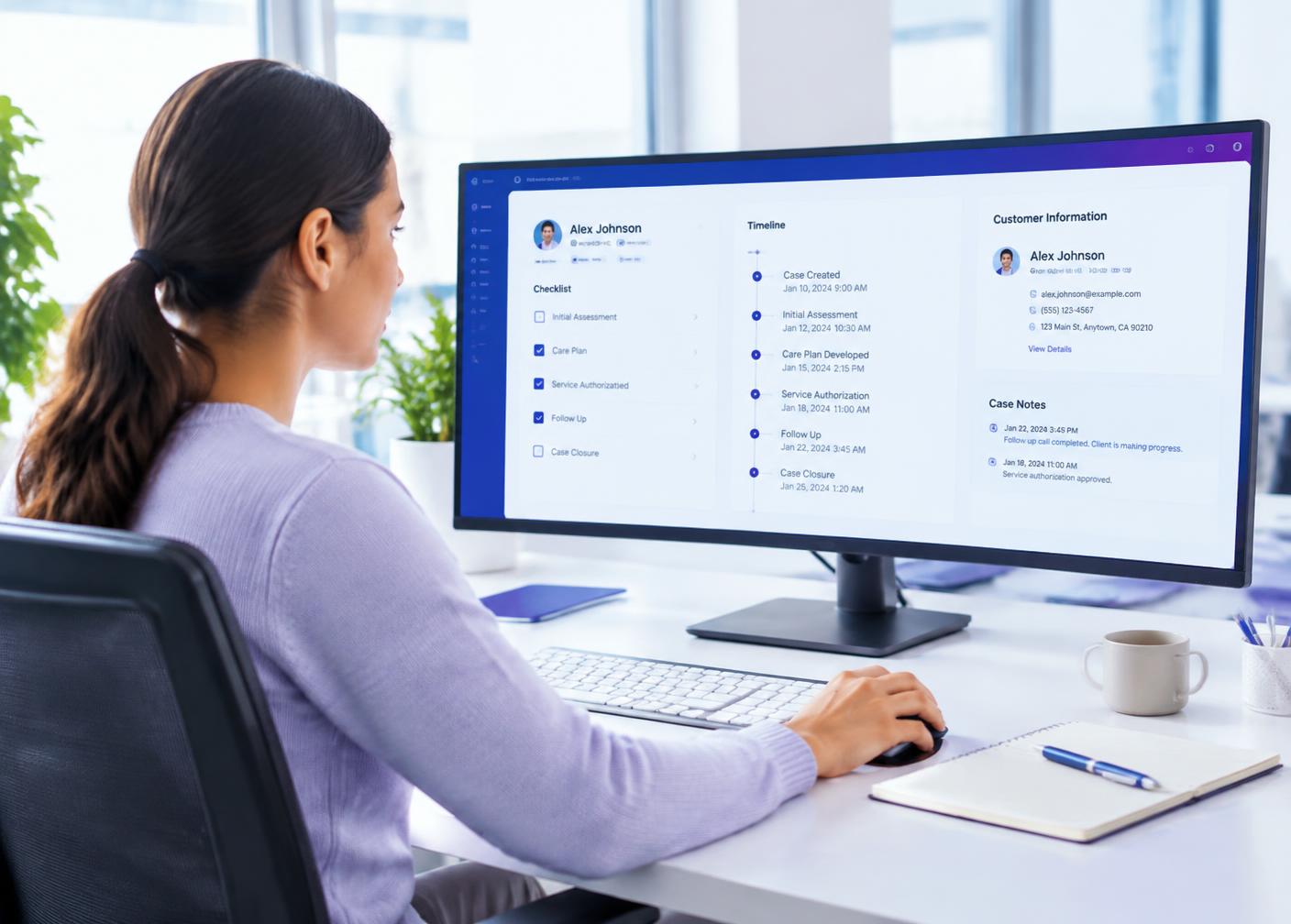
Case manager using a unified workspace with checklist and timeline
Customer context, checklists and history sit together in one view.
Team reviewing AI-drafted documents around a meeting table
AI prepares drafts; people review, adjust and approve.
  1. 01

    Gather

    Bring customer, case and knowledge together.

  2. 02

    Guide

    Follow checklists and decision trees.

  3. 03

    Draft

    Let AI prepare notes, letters and replies.

  4. 04

    Approve

    Review, sign off and record accountability.

Where AI Workspace helps first

Claims handling

Bring documents, policy details and checklists together for each claim.

Customer onboarding

Guide staff through verification, setup and welcome steps.

Complaint resolution

Track actions, deadlines and correspondence in one place.

Correspondence drafting

Prepare letters and emails from case context for review.

Shift handovers

Make every case self-explanatory for the next person.

Quality assurance

Review assisted actions with a clear record of approvals.

Account maintenance

Update customer details, preferences and linked records through guided steps that check each change against the relevant rules before it is saved.

Back-office processing

Work through queues of applications, renewals or requests with AI preparing each item so people can review and complete it quickly and accurately.

UNIFIED CONTEXT

Stop switching between ten systems.

Service and operations teams often spend much of their day moving between applications to understand a single customer or case. AI Workspace brings interaction history, customer details, open tasks and approved knowledge into one role-aware view, so people can focus on the work itself.

Views are tailored by role. A claims handler sees different information from a billing specialist or team leader, and each sees only what their permissions allow. Relevant items are surfaced automatically based on the case in front of them.

This clarity reduces errors caused by missed information and makes it easier to pick up a case started by a colleague.

GUIDED WORK

Complex processes made easier to follow.

Decision trees and checklists turn complex procedures into clear steps. The workspace shows what has been completed, what is outstanding and what the next sensible action is, with links to the relevant policy at each point.

For long-running cases, reminders and status tracking help ensure nothing falls through the cracks. Handover between people and shifts becomes straightforward because the case explains itself.

Guidance can be updated centrally as procedures change, so every team member works from the current process rather than an outdated document.

ASSISTED DRAFTING

AI prepares, people decide.

AI Workspace can draft emails, letters, case notes and summaries using the context already gathered, following your templates and tone. Team members review, edit and approve, keeping accountability exactly where it belongs.

Every assisted action is recorded, showing what the AI proposed and what the person approved. This supports quality assurance, audit and continuous improvement.

The combination is powerful: routine preparation happens in seconds, while human judgement remains at the centre of important decisions.

GOVERNANCE AND TRUST

Control built into AI Workspace from day one.

Every AIIT deployment of AI Workspace begins with a clear definition of what the AI may do, what it must never do and when it must hand over to a person. Those boundaries are written as configuration rather than left to chance, so they can be reviewed by operations, risk and compliance teams before anything reaches a customer. Access to systems is granted through scoped connections, and each connection is limited to the fields and actions the journey genuinely needs.

Conversation records, decisions and actions are logged so teams can see what happened and why. Sensitive information can be masked, retained for agreed periods or excluded from storage altogether, depending on your policies and the obligations that apply to your organisation. Client data is kept separate, and AIIT works with your team to align the deployment with New Zealand privacy expectations and your own security standards rather than asking you to accept a generic template.

Governance is also practical. Changes move through testing and approval before release, previous versions can be restored, and performance is reviewed against agreed measures. The aim is simple: a capability your people trust enough to use every day, because they understand how it behaves and can correct it when the business changes.

WHERE IT FITS

AI Workspace across New Zealand organisations.

Large enterprises use AI Workspace to bring consistency to high-volume service, where thousands of similar requests arrive every week across several channels and teams. In that setting, the value comes from dependable handling of routine work, clean handover of complex cases and reliable records that support reporting, compliance and continuous improvement. Integration with existing contact-centre, CRM and core platforms means the capability strengthens current investments rather than replacing them.

Medium-sized companies often face a different challenge: growing demand without a matching increase in headcount. Here AI Workspace helps a small service team cover more hours, respond faster and keep information organised, while the people on the team focus on the conversations that need experience, empathy and judgement. Deployments can start with one department and extend as the benefits become clear.

Small New Zealand businesses benefit from the same foundations in a simpler form. Owners and small teams use AIIT capabilities to answer enquiries when they are busy on the job, capture complete details for quotes and bookings, and present a professional first impression every time. Whatever the size of the organisation, the principle is identical: a Digital AI Employee handles the repeatable work within clear rules, and people remain in charge of the relationships and decisions that matter most.

MEASURING VALUE

Judge the results on your own evidence.

AIIT does not ask you to rely on generic industry figures. Before a pilot begins, we agree the measures that reflect your goals, which might include response times, completion rates, handover quality, after-hours coverage, customer effort, administrative time saved or the share of enquiries resolved without follow-up. A baseline is captured from your current operation so the comparison is fair.

During and after the pilot, dashboards and regular reviews show how AI Workspace is performing against those measures. Where results fall short, the conversation data usually shows why, whether that is unclear knowledge, a missing integration or a rule that needs refining, and the next improvement can be planned with confidence. This evidence-led approach helps leaders make sound investment decisions and gives teams a clear view of how the capability is helping them.

CONNECTED SYSTEMS

Useful because it is connected to how you work.

An AI capability is only as helpful as the information and actions available to it. AI Workspace connects to the systems that already run your organisation, such as CRM platforms, booking and scheduling tools, contact-centre software, ecommerce and order systems, policy or account platforms, knowledge bases and document stores. Those connections allow the AI to answer with current information and to complete tasks rather than simply telling customers to call back later.

AIIT designs each integration around the minimum access required. Read and write permissions are separated, sensitive fields can be excluded, and every action taken through a connection is logged. Where a system does not offer a modern interface, AIIT can work with secure file exchange, email workflows or intermediate services so the journey still flows smoothly. When systems are unavailable, the AI explains the situation honestly and captures what is needed for follow-up.

Connected data also improves the experience for your people. Summaries, outcomes and structured fields are written back to the records your team already uses, so nothing needs to be copied between screens. Reporting draws on the same information, giving leaders an accurate view of demand, resolution and handover across every channel.

THE PEOPLE SIDE

Designed to make good teams even better.

Introducing a Digital AI Employee changes how work is shared, and AIIT treats that change with care. We involve frontline staff early, because they know where customers struggle and which tasks drain their time. Their input shapes the journeys, the handover rules and the wording customers hear, which leads to better results and stronger support for the new way of working.

As routine work moves to AI Workspace, team members can spend more time on complex cases, relationship building and service improvement. Training, clear escalation paths and regular reviews help everyone understand what the AI handles and how to work alongside it. The outcome AIIT aims for is not fewer good people, but good people doing more meaningful work with better tools.

WORKING WITH AIIT

From first conversation to measurable pilot.

AIIT starts with your operation, not a product demonstration. We map the journeys that create the most repetitive effort or the most customer frustration, identify the systems and knowledge involved, and agree what a successful outcome would look like. That shared baseline matters, because it lets everyone judge the pilot on evidence from your organisation rather than on assumptions.

A focused pilot then puts AI Workspace to work on a small number of well-defined journeys. Your team reviews real interactions, refines wording and rules, and decides when coverage should expand. As confidence grows, the same foundations extend to new channels, departments and use cases without rebuilding from scratch. AIIT remains involved throughout, providing configuration, monitoring and ongoing improvement from Auckland, so you have a local partner who understands how New Zealand customers speak and what they expect.

POTENTIAL VALUE
01

Reduce switching between systems

02

Make complex work easier to follow

03

Preserve accountability in assisted tasks

Shape this capability around your operation.

Start the conversation
SAM JOBS

Explore 80+ SAM job descriptions

Browse 81 Typical SAM Roles — from receptionist and claims specialist to compliance, sales and operations — each a Digital Employee powered by ANNA and managed by AIM.

See what roles SAM's can do
ENQUIRE WITH AIIT

Start a conversation about ai workspace.

Tell us what you want to improve. Your enquiry will go directly to the AIIT team in Auckland.

Your enquiry is sent securely to hello@aiit.co.nz.